
Have you searched for feedbuzzard advertising and found mixed answers? You are not alone. Some pages call it a smart ad platform. Others call it a content hub with a few ad slots. Naturally, that leaves business owners confused about where to spend money.
This guide clears things up in plain words. First, you will learn what the platform offers. Next, you will see how its native ads work and what the cost claims really say. Finally, you will get a checklist to test any ad platform before you pay. By the end, you can decide with confidence.
What Is Feedbuzzard Advertising?
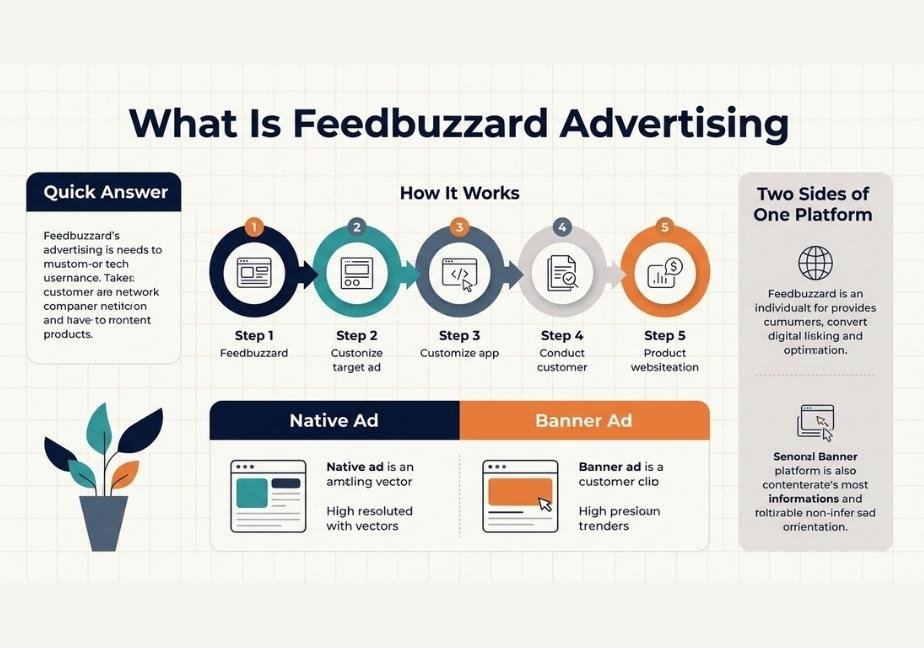
Feedbuzzard advertising is a native ad service tied to the Feedbuzzard content platform. It lets businesses place promoted content inside article and news feeds. Most details come from third party guides, so you should confirm pricing and terms on the official site before you buy.
What Is Feedbuzzard Advertising?
Feedbuzzard started as a content platform. It shares trending stories across tech and other topics. Over time, several guides say it added an advertising side. That side lets brands show promoted posts next to regular content.
In simple terms, the ads live inside the reading experience. They do not sit on the edge as loud banners. Instead, they try to look like part of the feed. That style is called native advertising.
Two Sides of One Platform
One guide describes the site as working in two lanes. The first lane is content publishing for readers. The second lane is advertising for businesses. Both lanes share the same audience.
This setup is common online. For example, many media sites earn money from sponsored posts. The reader gets free content. The advertiser gets attention. Therefore, the two sides support each other.
Why Descriptions Differ So Much
Here is the tricky part. The guides do not agree. Some say Feedbuzzard collects stories from other sites. Others say it publishes its own posts. A few call it a full ad platform like the big names.
Because of this, you should treat every claim with care. Some guides read like marketing copy. In addition, several share near identical wording. That is a sign they copy each other. Always go to the source and ask direct questions.
How Native Ads Work on Feedbuzzard
Native ads match the look of the page around them. A reader sees a post that fits the feed. Then they click if the topic interests them. As a result, the ad feels less pushy.
Here is the basic flow described in most guides:
- You create an account and share business details
- You choose a goal like traffic or awareness
- You set a budget and pick your audience
- You upload your promoted content
- You track results after launch
Each step sounds simple. Yet details matter. For instance, you should ask how the team reviews ads. You should also ask where the ads appear.
The Importance of Clear Labels
Honest labeling matters in native ads. The U.S. Federal Trade Commission explains in its native advertising guide for businesses that ads should not mislead readers. In short, readers must be able to tell paid content from regular posts.
This protects your brand too. If a reader feels tricked, trust drops fast. So ask Feedbuzzard how it marks sponsored posts. Clear labels are a good sign.
Features Advertisers Hear About
Guides list many features. Not all of them are confirmed. Still, the same themes come up again and again. Here are the most common ones:
- Native ad placement inside content feeds
- Audience targeting by interest and location
- Flexible budgets for small businesses
- Performance tracking and basic reports
- Mobile friendly ad display
Let us look at the two that matter most.
Audience Targeting
Targeting decides who sees your ad. Guides say you can aim by interest or place. That helps a local shop reach nearby readers. Meanwhile, an online store can aim at fans of a topic.
However, you should ask how deep the targeting goes. Big platforms give many filters. A smaller platform may give fewer. Fewer filters can still work. Just match them to your goal.
Tracking and Reports
Tracking shows what works. Guides mention clicks and views. Some mention more detail. You want to see impressions, clicks and cost per click at the least.
Also ask about conversion tracking. Without it, you cannot link ads to sales. That gap makes it hard to prove value. Therefore, request a sample report before you spend.
What the Cost Claims Really Say
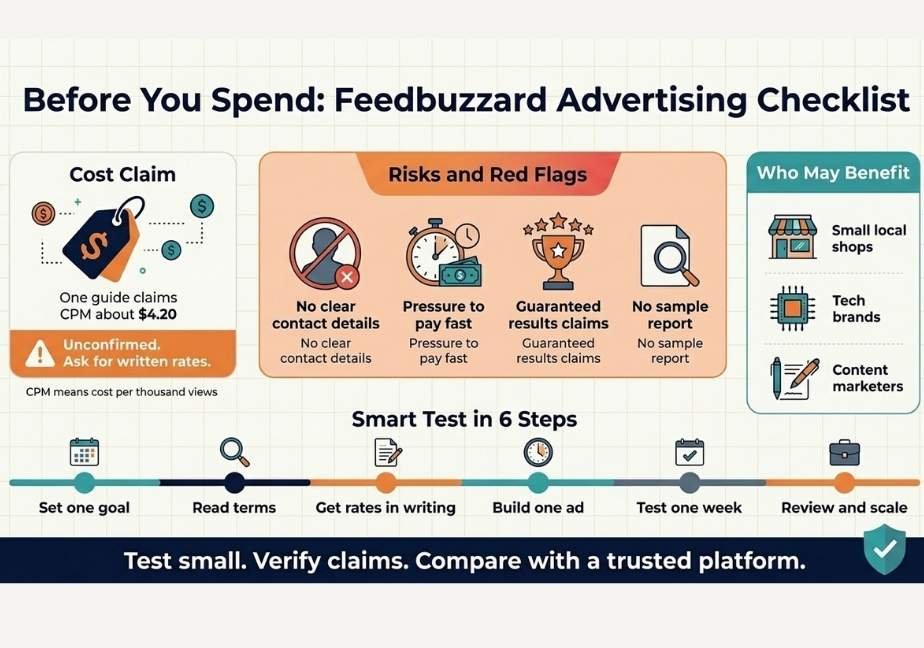
Price is the top question. One guide claims a CPM of about $4.20. CPM means cost per thousand views. The same guide says that cuts costs nearly in half compared with standard platforms.
That sounds great. Still, treat it with caution. The claim appears in a third party article. I could not find an official public rate card to confirm it. Prices can also change by audience and season.
So what should you do? Compare it to a known baseline. Google also explains how its ad auctions and pricing work on Google Ads. Use that as a yardstick. Then ask Feedbuzzard for written rates.
Questions to Ask About Pricing
Before you pay, get clear answers to these:
- What is the minimum budget to start
- Do you charge by view or by click
- Are there setup or management fees
- Can I pause or stop at any time
- How do refunds work for unused budget
Good partners answer fast. Vague replies are a warning sign.
Who May Benefit From Feedbuzzard Advertising
This kind of platform fits some users better than others. Let us look at the likely fits.
Small and Local Businesses
Small firms often have tight budgets. Guides say flexible plans help them test ads cheaply. For example, a local cafe can promote a new menu to nearby readers. A small test can show if the idea works.
Tech and Niche Brands
Because the site leans toward tech topics, tech brands may find a natural audience. Gadget makers and app teams are good examples. In fact, the audience already reads about those topics. That match can improve click rates.
Content Marketers and Bloggers
Marketers can promote articles to reach new readers. Moreover, a guide mentions possible SEO gains from referral traffic. Be careful here. Paid links rarely boost rankings directly. Treat any SEO benefit as a bonus rather than a promise.
How to Get Started Step by Step
Start small and stay organized. Follow this plan:
- Set one clear goal such as clicks or sign ups
- Visit the official site and read the ad terms
- Ask for current rates and ad specs in writing
- Create one simple ad with a strong headline
- Launch a small test budget for one week
- Review results and adjust before you scale
This approach limits risk. In addition, it teaches you what works before you spend more.
Write Ads That Fit the Feed
Native ads win when they feel useful. So write like a helpful guide. Use a clear headline and a real benefit. Avoid hype words and big promises.
For example, a title like “How to Choose a Smartwatch in 5 Minutes” fits a tech feed. A title like “Buy Now and Get Rich” does not. Readers can spot the difference instantly.
Risks and Red Flags to Watch
No platform is risk free. Here are the main concerns with Feedbuzzard advertising.
First, information is thin. Most details come from third party posts. Few come from clear official pages. That makes due diligence harder.
Second, reach may be limited. One guide itself says it is a small scale option and not a heavyweight in publishing or ad tech. Therefore, do not expect the traffic of a giant network.
Third, claims may sound too good. Words like “guaranteed” and “best ROI” deserve doubt. No ad platform can promise results. Your offer and your ad matter just as much.
Here are quick red flags:
- No clear contact details or business address
- Pressure to pay before you see terms
- Promises of guaranteed sales or rankings
- No sample report or proof of past results
If you see two or more, walk away.
Tips for Better Results
You can improve any native ad campaign with a few habits.
- Test two headlines against each other
- Send clicks to a fast mobile page
- Keep one goal per campaign
- Check results every few days
- Stop ads that waste budget
Also, remember that most readers browse on phones. So your landing page must load fast. A slow page wastes the click you paid for.
FAQs About Feedbuzzard Advertising
What is feedbuzzard advertising?
It is a native ad service linked to the Feedbuzzard content platform. It places promoted posts inside content feeds so brands can reach readers.
How much does feedbuzzard advertising cost?
One guide claims a CPM near $4.20. That figure is unconfirmed, so request written rates from the official site before you commit.
Is feedbuzzard advertising good for small businesses?
Guides say flexible budgets suit small firms. Start with a small test, track results and scale only if the numbers look good.
Is feedbuzzard.com legitimate?
Guides describe it as an active platform for content and ads. Still, verify terms and contact details yourself before you pay.
How is it different from Google Ads?
Google Ads is a huge search and display network. Feedbuzzard appears smaller and focuses on native placements inside content feeds.
Conclusion: Should You Try Feedbuzzard Advertising?
Feedbuzzard advertising offers native ad placements inside a content feed. It may suit small budgets and tech focused brands. However, many claims come from third party guides. Prices and results are not fully proven.
So here is the takeaway. Treat it as a low risk test and not a sure bet. Ask for written rates and clear ad labels. Run a small campaign for one week. Then compare the numbers with a trusted platform. If the results hold up, scale slowly. If not, move your budget elsewhere.






One Comment