
You may have seen the name in a search result or a link. Now you want a straight answer. PushWiki explained in one line: it is a general information website. But the name suggests more than that, and that is where the confusion starts.
This guide breaks it down in plain words. You will learn what PushWiki is, what it covers and how it works. You will also see how it compares to Wikipedia and whether it is safe to use. So let’s start with the short answer.
What Is PushWiki?
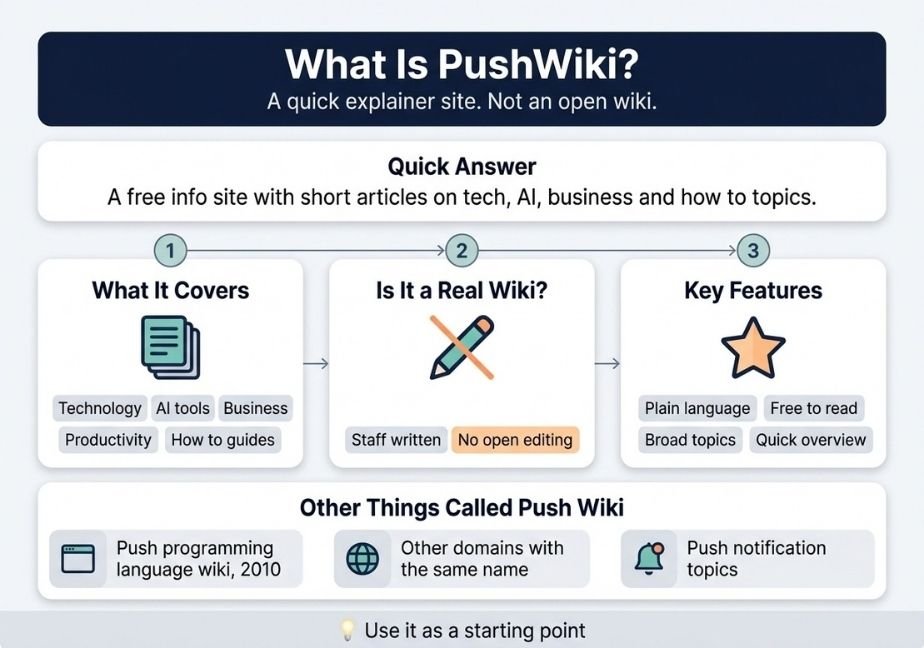
PushWiki is a free information website that publishes short articles and guides on technology, AI tools, business and everyday how to topics. Despite the name, it is not an open wiki that anyone can edit. It works better as a quick starting point than as a final source.
What Is PushWiki?
PushWiki is a web publication. It posts explainers, guides and reference style pages. The goal is simple. It tries to answer a question in plain language without heavy jargon.
According to a review on About Chromebooks, the site runs on WordPress and covers technology, AI tools, business, productivity and general how to material. Another write up describes it as a site that publishes articles, guides and reference pages across several subject areas. So the picture is fairly clear. It is a broad, general site. aboutchromebookscoopboardgames
Still, you should know a limit. Most of what exists about PushWiki comes from small blogs. No major outlet has covered it in depth. So treat every claim, including mine, with care.
What Topics Does It Cover?
The range is wide. You will find posts in areas like these:
- Technology and gadgets
- AI tools and trends
- Business and productivity
- Websites and online tools
- General how to guides
That mix is both a strength and a weakness. On one hand, you can find many topics in one place. On the other hand, a site that covers everything rarely goes deep on anything.
Is PushWiki a Real Wiki?
Not in the classic sense. A true wiki lets many users add and edit pages. Wikipedia is the best known example. The word “wiki” comes from a Hawaiian term that means quick. As Wikipedia’s overview of wikis explains, a wiki is a site where users can collaboratively edit content.
PushWiki does not follow that model. One review notes that readers cannot add content unless they have special access. So it behaves like a normal blog or magazine. The editors write the pages. Readers simply read them. editorialge
That does not make the site bad. It just means the name can mislead you. Do not expect open editing or a huge community of volunteers.
Other Things Called “Push Wiki”
The name is not unique. That is a big reason people search for it. Several different things share it.
First, there is a programming link. Back in 2010, a researcher named Thomas Helmuth started a documentation wiki for the Push programming language. Push is a language used in genetic programming research. That wiki has nothing to do with the general info site. hampshire
Second, more than one web address carries the label. One review warns that several domains use the PushWiki name, and the live tech and AI version sits on a hyphenated address. So check the exact URL before you trust a page. aboutchromebooks
Third, the word “push” is common in tech. People often mean push notifications or push to talk tools. A search for “push wiki” can show those topics too.
So here is a quick rule. If you want coding research, look for the Push language community. If you want a general explainer site, you likely mean PushWiki the publication. Context tells you which one applies.
Why People Search for PushWiki
Most searchers have simple goals. Here are the common ones:
- They found a link and want to know if it is real.
- They need a fast explanation of a tech topic.
- They want to know if the site is safe.
- They wonder if it can replace Wikipedia.
- They are curious about who runs it.
Notice the trend. Many people want to check the site before they trust it. That is a smart habit. In addition, the name looks like a wiki, so people expect more than they get.
Key Features of PushWiki
The site keeps things simple. That is its main selling point. Let’s look at the features most reviews mention.
Plain Language
Articles use short sentences and common words. Because of this, beginners can follow along. You do not need a technical background to read a post.
Free Access
The site is free to read. Reviews say you do not need an account or a login. So you can open a page and start reading right away. Also, you do not hand over any personal details to browse.
Broad Topic Range
One site covers many subjects. For example, you can read about an AI tool and then a business tip in the same visit. That variety suits casual readers.
Quick Orientation
Posts give you a fast overview. They work well as an intro. Then you can move on to deeper sources if you need them. That is the best way to use the site.
How to Use PushWiki Step by Step
Using it takes no skill. Here is a short path:
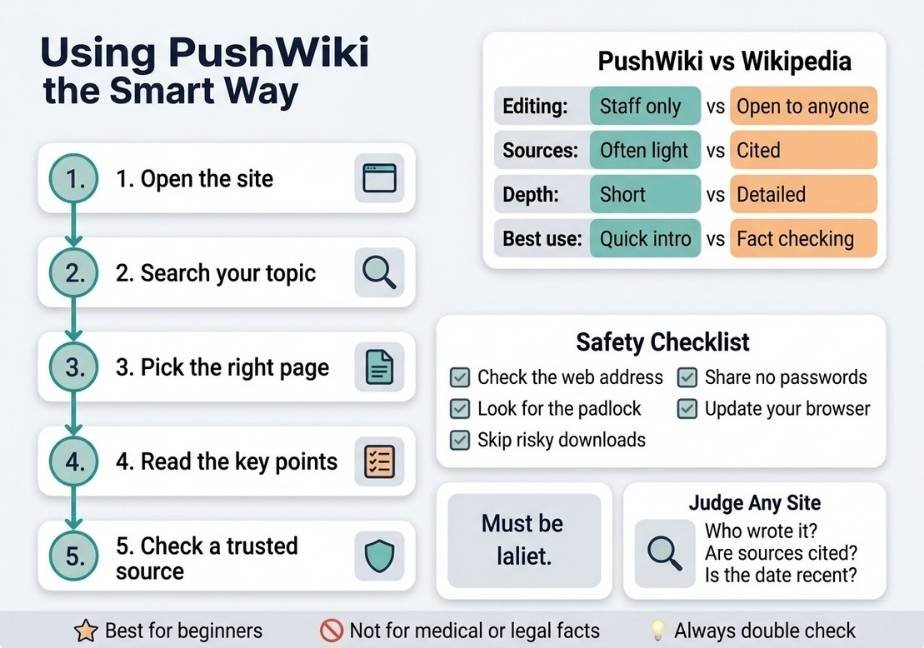
- Open the site in your browser.
- Type your topic into the search bar.
- Pick the page that matches your question.
- Read the summary and the key points.
- Check a trusted source for any fact you plan to use.
The last step matters most. Never stop at the first page you find. Instead, use it as a launch pad. For instance, if you read about a new AI tool, confirm the details on the maker’s own site.
PushWiki vs Wikipedia
Many people ask this. The two sites are very different. The table below shows the main gaps.
| Feature | PushWiki | Wikipedia |
|---|---|---|
| Editing | Staff only | Open to anyone |
| Sources | Often light | Cited and reviewed |
| Depth | Short overviews | Detailed entries |
| Topics | General and tech focus | Almost everything |
| Reading style | Very simple | More formal |
| Best use | Quick intro | Fact checking |
So which is better? It depends on your goal. If you want speed and plain words, PushWiki can help. If you need cited facts, Wikipedia wins. However, even Wikipedia is a starting point. Teachers and researchers often tell students to check its sources directly.
In short, they serve different needs. Use one for a quick idea and the other for solid references.
Strengths and Limits
Every site has good and bad sides. Let’s be fair to both.
What PushWiki Does Well
- It explains topics in simple words.
- It loads fast and stays easy to read.
- It costs nothing to use.
- It covers many everyday tech questions.
- It suits beginners and busy readers.
These traits make it handy for a first look at a subject. For example, if a friend mentions a tool you never heard of, a short article can give you the basics in minutes.
Where It Falls Short
However, there are real limits. Keep these in mind:
- Pages often lack clear sources.
- Authors are rarely named in detail.
- Depth is thin on complex topics.
- Open editing and community review do not exist.
- Information can age fast in tech topics.
That last point matters. Tech news changes every week. So an article from last year may now be wrong. Always check the date on a post.
Is PushWiki Safe and Legit?
Based on the reviews I found, yes, it looks like a normal publishing site. One review calls it legitimate, free and safe to browse. It does not ask for payment or personal data to read. That is a good sign. aboutchromebooks
Still, I could not verify this myself. I did not test the site. And remember the domain issue. Since several addresses use the same name, a fake or copycat page could exist. So take a few simple steps:
- Check that the web address matches the one you meant to visit.
- Look for the padlock icon in your browser bar.
- Never download files from a page you do not trust.
- Do not enter passwords or card details on an info site.
- Keep your browser and antivirus up to date.
If anything looks odd, leave. A real info site has no reason to ask for sensitive data.
How to Judge Any Information Site
PushWiki is one of many sites like it. So it helps to know how to size up any source. Google offers useful advice here. Its guide on creating helpful, reliable content points to signs of quality. It asks whether a page shows real expertise, has a clear author and gives original value to readers.
You can use those same questions as a checklist:
- Who wrote this page and what do they know?
- Does the page cite sources I can check?
- Is the date recent enough for this topic?
- Does it give real value or just filler?
- Do other trusted sites agree with it?
If a page fails most of these, do not rely on it. Then look for a better one. This habit will serve you well far beyond PushWiki.
Who Should Use PushWiki?
The site fits some readers better than others. Let’s sort it out.
It works well for beginners who want a simple intro. It also suits busy people who need a quick summary. Casual readers who like short posts will enjoy it too. In addition, bloggers can use it to get a first idea of a topic before they dig deeper.
On the other hand, it is not ideal for students writing a paper. It is also a poor fit for anyone who needs medical, legal or financial facts. For those, go to official or expert sources. Those topics carry real stakes, so accuracy matters more than speed.
Tips to Get the Most Out of PushWiki
Small habits make the site more useful. Try these:
- Read the first paragraph to see if the page fits.
- Note the publish date before you trust the facts.
- Open a second source to confirm key claims.
- Use the page to learn the basic terms.
- Save the topic and search deeper later.
Also, treat it as a map rather than a destination. A map shows you the way. It does not replace the trip. When you use PushWiki like that, you get the best of it and avoid its weak spots.
FAQs
What is PushWiki?
It is a free general information website with short articles on tech, AI, business and how to topics. It is not an open, editable wiki.
Is PushWiki safe to use?
Reviews describe it as safe to browse, and it asks for no payment. Still, verify the web address and avoid downloads or sharing personal data.
Is PushWiki the same as Wikipedia?
No. Wikipedia is open to editing and cites sources. PushWiki is staff written, shorter and lighter on references. Use it for quick intros only.
Can I edit or contribute to PushWiki?
Not freely. Reports say readers cannot add content without special access. It works like a blog, not a community wiki.
Is PushWiki accurate enough for research?
Not on its own. Use it for a quick overview, then confirm facts with official or well cited sources before you rely on them.
Conclusion
So, what is PushWiki? It is a simple, free information site that explains tech and everyday topics in plain words. It is not a true wiki. You cannot edit it, and it does not have the sources or depth of a place like Wikipedia.
Here is your takeaway. Use PushWiki to get oriented fast. Then double check the facts somewhere stronger. Also confirm the web address, since other sites share the name. If you follow those two habits, you can enjoy the site for what it does well and skip the risks. That is the smart way to use any quick explainer on the web.






3 Comments