
You typed “sfm compile” into Google and you want a clear answer. That makes sense. The phrase confuses many people because it points to two different things. One is a technical task inside Source Filmmaker. The other is a kind of video that fans share online.
This guide clears it up fast. You will learn what SFM compile means, where the term comes from and how model compiling works step by step. You will also see common errors, quick fixes and a few safety points. So let’s start with the short answer.
What Does SFM Compile Mean?
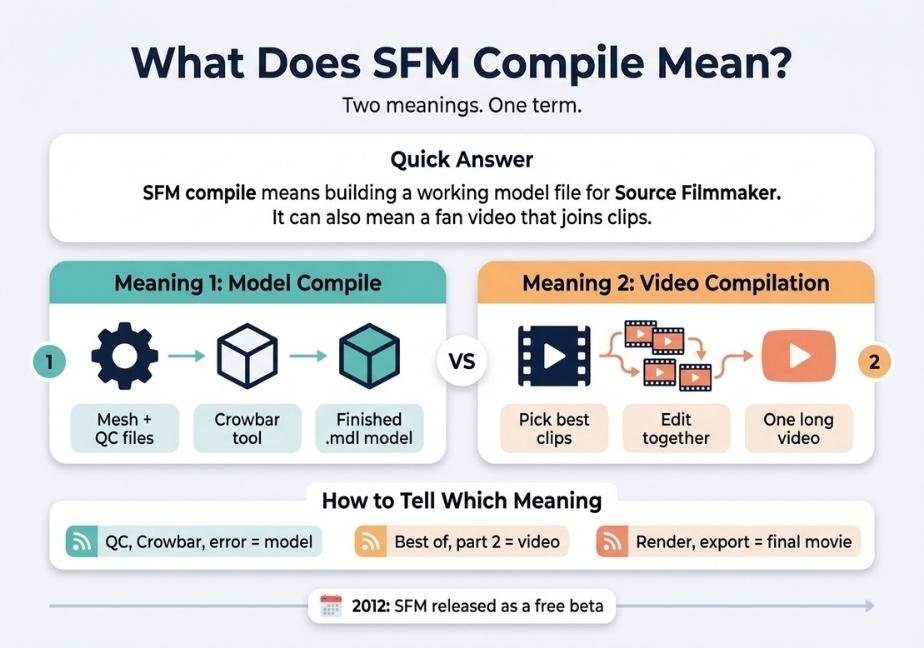
SFM compile has two meanings. In Source Filmmaker, it means turning model source files into a finished .mdl file that the program can load. Among fans, it can also mean one video that joins many SFM clips together.
What Is Source Filmmaker?
Source Filmmaker, or SFM, is a free movie making tool from Valve. It runs on the Source engine. That is the same engine behind Team Fortress 2 and Half Life 2. Valve built it in house to make short films for its own games. Then it released the tool to the public as a free beta in 2012.
SFM works like a digital film set. You place characters, move cameras and set lights. Then you record the scene as a movie. According to Wikipedia’s Source Filmmaker entry, the tool lets users make movies inside the Source engine with game assets. That detail matters here. SFM can only use assets that the engine understands. So custom content must be compiled first.
The Two Meanings of SFM Compile
The term has a split personality. So context is everything. Let’s look at both meanings.
Meaning 1: Compiling a Model
In tech, to compile means to convert. You write files that humans can read. Then a program turns them into a format the engine can read. Source works the same way. A model starts as a mesh file and a script file. The compiler merges them into a finished model.
This is the most common meaning in forums, tutorials and error threads. If you see words like QC, Crowbar or studiomdl, this is the one.
Meaning 2: A Video Compilation
Fans also use “compile” for a video that strings clips together. Think of a highlight reel. A creator picks the best scenes. Then they edit them into one longer video.
However, you should know one thing. A large share of fan made SFM content is adult. Because of that, many sites age gate it or limit it. So be careful when you search this meaning. This guide focuses on the technical side, which is safe for everyone.
How to Tell Which Meaning Applies
The words around the term give it away. Here is a quick check:
- Words like QC, Crowbar, error or bones point to model compiling.
- Words like best of, part 2 or full video point to a clip compilation.
- Words like render or export point to making a finished movie.
Where the Term Comes From
The word “compile” comes from programming. A compiler reads source code and builds a program from it. Valve’s tools use the same idea. Map makers have long used compile tools to turn map files into playable maps. Model makers use a tool called studiomdl.
According to the Valve Developer Community, studiomdl is the tool that compiles models for the Source engine. It reads a QC script and your mesh files. Then it builds the model files. So when someone says “SFM compile,” they often mean running that process for an SFM project.
Why People Compile Models for SFM
SFM ships with a lot of Valve characters and props. Yet creators want more. Compiling opens the door to custom content. Here are the main reasons people do it:
- They want to bring in a custom character or prop.
- They want to port a model from another game.
- They need to fix or edit an existing model.
- They want to change textures or body groups.
- They want to test a model they built in Blender.
Editing is a big one. Many creators decompile a model first. Then they change it. Finally they compile it again. That loop is the heart of SFM model work.
What You Need Before You Start
Good prep saves hours. So gather these items first:
- Source Filmmaker installed through Steam.
- Crowbar, a free tool for compiling and decompiling Source models.
- A mesh file in SMD or DMX format.
- A QC file that tells the compiler what to build.
- Textures in VTF and VMT format.
- Blender with the Source Tools add on if you build your own models.
Also, keep your folders simple. Short paths with no odd symbols cause fewer errors. For example, use a folder like C:\sfm_work instead of a deep nested path.
What a Compile Creates
A successful compile makes several files. Each one has a job.
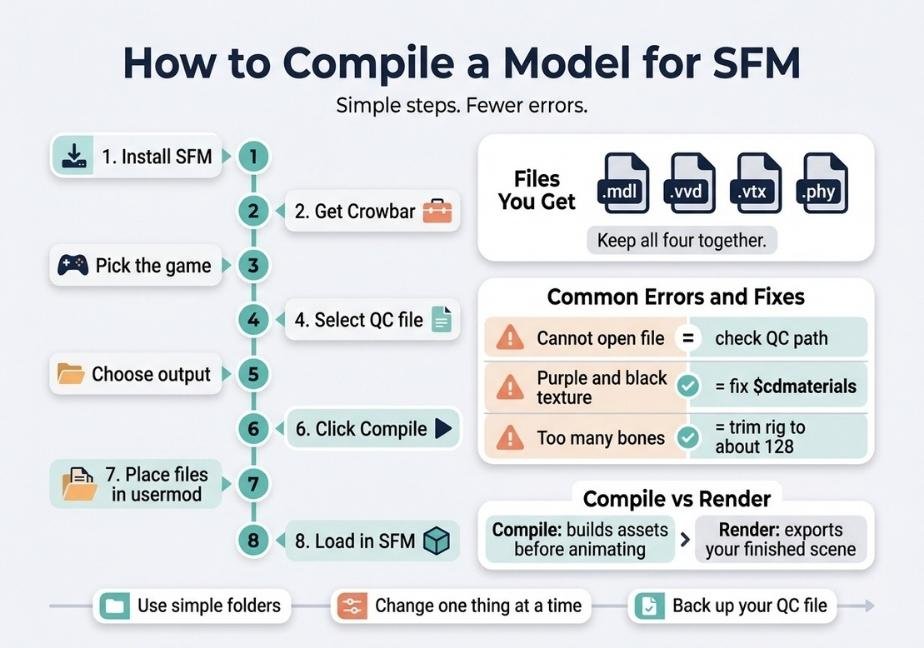
- The .mdl file holds the main model data.
- The .vvd file stores vertex data.
- The .vtx file stores render mesh data.
- The .phy file stores physics data.
You need all of them together. If one goes missing, the model may fail to load. So always move them as a group.
How to Compile a Model for SFM Step by Step
Here is the full process in short form. Then we will go through the tricky parts.
- Install SFM from Steam and run it once.
- Download Crowbar and unzip it to a simple folder.
- Open Crowbar and pick Source Filmmaker as the game.
- Open the Compile tab and select your QC file.
- Choose where the finished files should go.
- Click Compile and read the log.
- Place the files in the usermod models folder if needed.
- Load the model inside SFM.
Set Up Crowbar the Right Way
First, run SFM at least once. This creates the folders that Crowbar needs. Next, open Crowbar and go to the Set Up Games tab. Choose Source Filmmaker from the list. Crowbar then finds the right studiomdl tool for you.
This step trips up many beginners. If you pick the wrong game, the compile may fail or give odd results. So double check it.
Pick the QC File and Output Folder
Now open the Compile tab. Click Browse and select your QC file. Then choose the output option. You can send files straight to the game’s model folder. Or you can pick a custom folder and move the files later.
For SFM, the target is the usermod folder inside the game directory. Models go in usermod/models. Materials go in usermod/materials. Keep the same folder names you used in the QC file. Otherwise SFM will not find your textures.
Read the Log
Click Compile. Crowbar then shows a log. Do not skip it. The log tells you what went right and what went wrong. A good compile ends with a clear success message. A bad one lists errors in plain text.
Also, scroll up. The first error is often the real cause. Later errors are usually side effects.
Load the Model in SFM
Open SFM and load a session. Then right click in the Animation Set Editor. Choose the option to create an animation set for a new model. Browse to your .mdl file and select it. Your model will appear in the scene.
If it loads and looks right, you are done. If not, check the next sections.
Understanding the QC File
The QC file is the recipe. It tells the compiler what to build and how. You do not need to master it on day one. Still, a few commands show up in almost every file.
- $modelname sets the name and path of the finished model.
- $bodygroup lets you swap mesh parts like hats or hair.
- $cdmaterials tells the engine where to find textures.
- $sequence defines an animation or a reference pose.
- $surfaceprop sets the material type for physics and sound.
Of these, $cdmaterials causes the most trouble. It must match your real texture folder. So spend time getting it right.
Also, remember that QC files are plain text. You can open them in any basic editor. Just keep the original safe before you change anything.
Common SFM Compile Errors and Fixes
Errors are normal. Even experts hit them. Here are the most common ones and what to do.
| Problem | Likely Cause | Fix |
|---|---|---|
| Cannot open file | Wrong path in the QC | Check the file names and folders |
| Purple and black texture | Wrong $cdmaterials or missing VMT | Match the folder and add the files |
| Too many bones | Model passes the bone limit | Remove extra bones in your 3D tool |
| Model shows in T pose | No animation sequence set | Add a reference sequence to the QC |
| Model will not load | Missing companion files | Copy all .mdl .vvd .vtx and .phy files |
Source has a limit of around 128 bones per model. So very complex rigs can fail. If you hit that cap, trim the rig. Also check that your file names have no spaces or odd symbols. Those can break paths.
SFM Compile vs SFM Render
Many people mix these up. They are not the same thing. Compile prepares assets. Render makes the final movie.
Here is the simple difference. Compiling happens before you animate. It builds the model that you will use. Rendering happens after you animate. It turns your scene into video or image files. In SFM, you do this through the export movie option.
So if your goal is a finished video, you need both steps in order. First compile any custom models. Then build your scene. Finally render it.
If you are working on a video compilation, there is one more step. You export your clips. Then you join them in a video editor. That is where the fan meaning of “compile” comes in.
Tips to Compile Faster and Cleaner
Small habits make a big difference. Try these:
- Keep every project in its own folder.
- Use lowercase names with no spaces.
- Compile after each small change.
- Back up the QC file before you edit it.
- Test the model in SFM right away.
Also, change one thing at a time. If you change five things and the compile fails, you will not know why. Small steps make bugs easy to find. In addition, keep notes. A short text file with your settings will save you later.
Finally, ask for help in the right place. Modding forums and community wikis have detailed threads on almost every error. Post your log text. People can help much faster when they see it.
Safety, Legal and Content Notes
Custom models come from many sources. So take a few precautions.
First, download from trusted sites. Random files can hide harmful code. Scan anything you get. Next, read the creator’s rules. Many models have usage terms. Some ban reuse or need credit. Respect them.
Then think about content. Some SFM fan content is for adults only. If you share your work, follow each platform’s rules. Also keep it age appropriate if kids might see it. This protects you and your audience.
Lastly, do not claim someone else’s work as yours. Credit the original artists. It keeps the community healthy.
FAQs
What does SFM compile mean?
It means building model files for Source Filmmaker with a compiler. It can also describe a fan video that joins many SFM clips into one.
What is the best tool to compile SFM models?
Crowbar is the most popular choice. It is free and easy to use. It runs studiomdl for you and shows a clear log.
Why does my SFM model look purple and black?
The textures are missing. Check your $cdmaterials path in the QC file. Then make sure the VMT and VTF files sit in that folder.
Is SFM compile the same as rendering?
No. Compiling builds assets before you animate. Rendering turns your finished scene into a movie. You usually do both in that order.
Is Source Filmmaker free?
Yes. Valve offers it free on Steam. You only need a PC that can run it and enough space for the content.
Conclusion
So, what does SFM compile mean? In most cases, it means converting model source files into a working model for Source Filmmaker. The tools are simple. Crowbar runs the compile. The QC file gives the orders. The log tells you what happened.
The term can also mean a fan video that joins many clips. Context tells you which one applies. If you only remember one thing, remember this. Keep your folders clean and your paths exact. Most compile errors come from small path mistakes. Fix those first. Then test often and change one thing at a time. With that habit, you will compile models with far less stress.